Game Over Back to School RETRO DESIGN: What It Is, How It Fits Your Craft Workflow, and When It Makes Sense
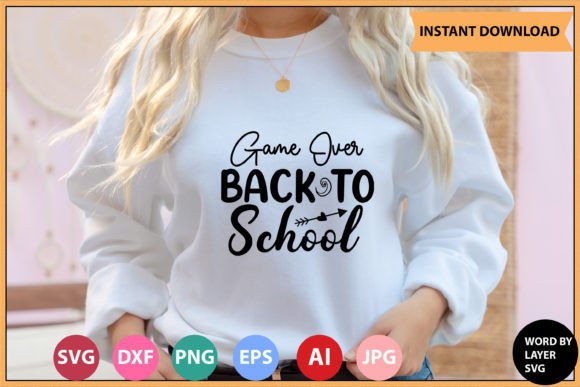
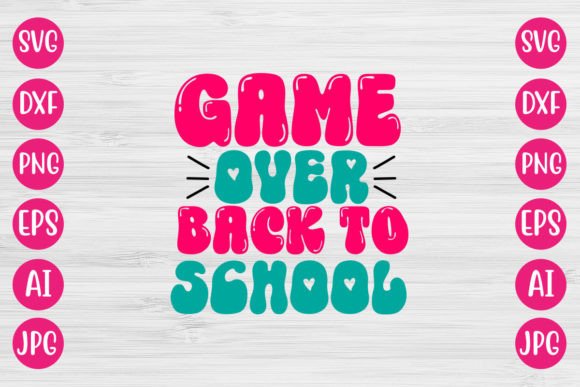
The Game Over Back to School RETRO DESIGN is a digital vector art file set built around a playful, nostalgic 1980s–1990s arcade aesthetic—think pixel-inspired outlines, bold blocky fonts, and high-contrast color blocking—applied to a lighthearted “back to school” theme. Unlike generic school-themed clipart or modern minimalist SVGs, this design leans deliberately into retro gaming visual language: the phrase “GAME OVER” appears prominently, often stylized like an arcade cabinet screen, while “BACK TO SCHOOL” follows in complementary type that mimics CRT scan lines or chiptune typography. It’s not just thematic—it’s stylistically cohesive, with intentional spacing, layer alignment, and scalable geometry optimized for cutting and printing.
What You Actually Receive (No Physical Items)
This is a digital download only. There is no printed poster, vinyl decal, or physical craft kit shipped. Your purchase delivers a single .zip file containing seven distinct file formats:
- 1 Adobe Illustrator (.ai) file — fully editable, layered, with live text and vector paths
- 1 SVG file — optimized for web use and compatible with most cutting machines
- Word-by-layer SVG files — each word (“GAME”, “OVER”, “BACK”, “TO”, “SCHOOL”) saved as its own SVG, allowing independent resizing, repositioning, or color assignment
- 1 PNG file — transparent background, 300 DPI, suitable for digital overlays or mockups
- 1 EPS file — legacy vector format, useful for older print workflows or compatibility with certain RIP software
- 1 DXF file — widely supported by CNC tools, laser cutters, and some CAD-based vinyl cutters
- 1 JPEG file — high-resolution, RGB, ideal for quick reference or social media previews
All files are pre-organized, named consistently, and tested across common platforms—including Cricut Design Space, Silhouette Studio (v5+), Inkscape (1.3+), Adobe Photoshop (CC 2022+), and Adobe Illustrator (CC 2021+). No font substitutions or missing assets are required; all text is converted to outlines in vector files unless noted otherwise in the AI version.
How It Compares With Other Back-to-School Digital Designs
Most back-to-school SVG bundles fall into one of three categories: modern clean, hand-drawn whimsical, or education-themed icon sets. The Game Over Back to School RETRO DESIGN sits outside those clusters. Its strength lies in specificity—not broad utility. While a generic “school supplies” SVG pack may include pencils, apples, and notebooks for general classroom decor, this design targets a narrow but growing niche: educators and parents who want to signal levity, resilience, or shared cultural memory around academic transitions.
Compared to freely available retro-style vectors online, this set offers production-ready precision: consistent stroke weights, properly grouped layers, and intentional kerning between words. Free alternatives often rely on raster effects or unoptimized paths that break when scaled beyond 24 inches—or worse, fail silently during cut preview in Cricut or Silhouette software. This design avoids those pitfalls through manual path cleanup and testing at multiple output sizes (from 3-inch iron-on transfers to 36-inch wall decals).
Strengths and Practical Fit
The layered, word-by-word SVG structure supports flexible adaptation. For example:
- A middle school teacher might isolate “BACK TO SCHOOL” for a bulletin board header while using “GAME OVER” separately on a stress-relief poster for students
- A small business owner creating custom tumblers could apply “GAME OVER” in matte black vinyl and “BACK TO SCHOOL” in glossy teal—each word cut from different material rolls without re-importing or regrouping
- An after-school program coordinator could import the DXF into LightBurn and engrave the full phrase onto acrylic awards, adjusting spacing to fit curved surfaces
The retro styling also carries functional advantages: high contrast improves readability at distance, and the bold geometry tolerates minor misalignment during weeding or heat pressing better than fine-line script fonts.
Limitations and Tradeoffs
This is not a multipurpose toolkit. It does not include alternate color palettes, alternate versions (e.g., “GAME ON” or bilingual variants), or additional elements like borders, icons, or backgrounds. If your project requires subtle gradients, photorealistic textures, or responsive web animation, the static vector nature of these files means extra work—either via post-processing in Photoshop/Illustrator or integration with CSS/SVG filters.
Also, while compatible with Cricut and Silhouette, users relying exclusively on mobile apps (like Cricut Design Space iOS/Android) may find the word-by-layer SVGs require manual grouping before scaling uniformly—unlike unified SVGs that retain proportional relationships automatically. That’s not a flaw, but a format tradeoff: granular control versus out-of-the-box simplicity.
When This Design Fits—and When It Doesn’t
The Game Over Back to School RETRO DESIGN works best when:
- You’re designing for an audience already familiar with retro gaming cues (e.g., Gen X or millennial teachers, students in digital media classes, or youth groups with strong pop-culture literacy)
- Your use case benefits from modularity—such as applying parts of the phrase across different materials, surfaces, or timelines (e.g., “GAME OVER” on orientation day swag, “BACK TO SCHOOL” on first-day banners)
- You need reliable, repeatable output across varied hardware—especially if you regularly switch between Cricut, Silhouette, and laser tools
It’s less suitable if:
- You need accessibility accommodations (e.g., braille-ready files or WCAG-compliant contrast ratios—this design prioritizes stylistic contrast over strict compliance)
- Your project demands rapid iteration across dozens of color variants (no built-in color-swapping system or global swatches beyond the AI file)
- You’re working in environments where retro aesthetics feel culturally incongruent—such as formal district communications or international bilingual settings without prior context
Real-World Compatibility Notes
Testing confirms the SVG renders correctly in Cricut Design Space v7.5+ with no offset errors. In Silhouette Studio Business Edition, the DXF imports cleanly for CNC routing, and the EPS opens without clipping in older versions of CorelDRAW used by some print shops. Inkscape users report successful editing of individual layers, though the AI file remains the most stable option for complex recoloring or reflowing text blocks.
No third-party fonts are embedded or required. All type is outlined in SVG, DXF, EPS, and JPEG versions; only the native AI file retains editable text for those who wish to modify wording (e.g., changing “SCHOOL” to “CLASSROOM”).
Making Your Decision
If your goal is expressive, recognizable, and technically sound retro-themed back-to-school content—with flexibility across cutting, engraving, and digital display—the Game Over Back to School RETRO DESIGN delivers focused value. It trades breadth for polish, and generality for intentionality. That makes it especially useful when consistency matters more than variety: think school spirit campaigns, themed staff appreciation kits, or student-led design challenges where visual cohesion reinforces messaging.
But if you’re assembling a large library for ongoing seasonal projects—or need adaptable templates for diverse age groups, subjects, or learning modalities—you’ll likely pair this with other resources rather than rely on it exclusively. As with any specialized digital asset, its usefulness scales with how well its constraints align with your actual workflow, tools, and audience expectations.