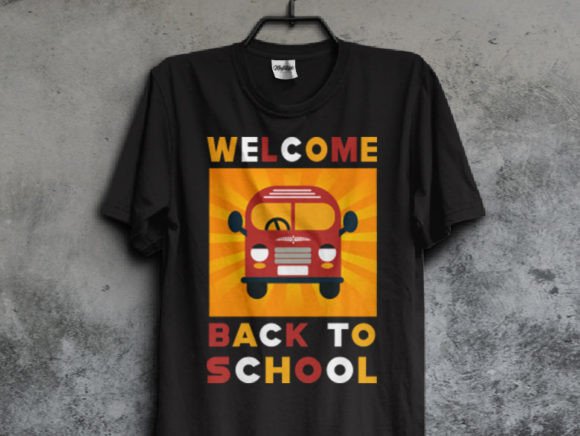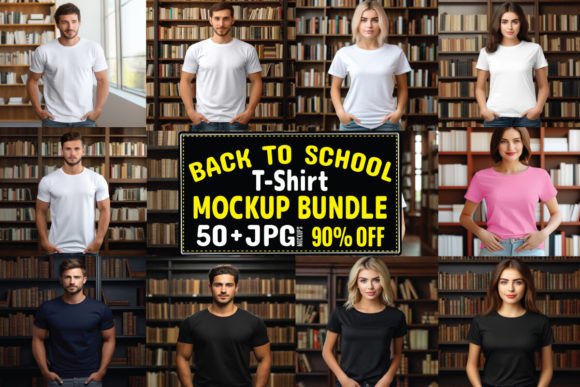
Back to School T-shirt Mockup Bundle 1
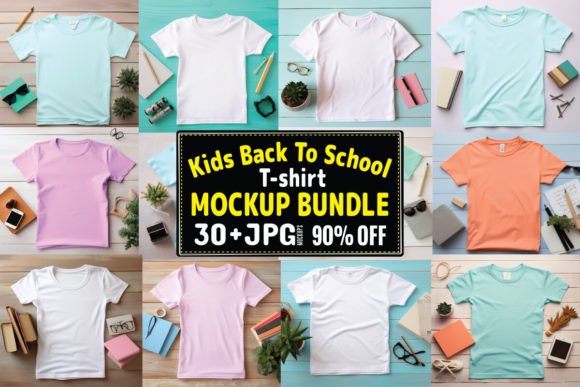
Whether you're launching a seasonal merch line, designing custom apparel for a school PTA, or building a small-batch brand around back-to-school energy, Back to School T-shirt Mockup Bundle 1 gives you realistic, studio-quality presentation—without the studio budget or timeline. These aren’t generic templates pulled from stock libraries. Each mockup is shot with intentional lighting, natural fabric drape, and authentic garment texture: soft cotton tees in classic fits, laid flat or worn on diverse models, with subtle shadows and gentle folds that mimic real-world wear.
The bundle leans into warm, approachable professionalism—think crisp but not clinical, clean but not sterile. You’ll find front-and-center flat lays, angled chest views, and relaxed lifestyle shots where the shirt sits naturally on the body—not stretched, not stiff, not overly stylized. That realism matters: when your audience sees a design rendered on one of these mockups, they’re not just seeing a graphic—they’re picturing how it feels, how it moves, how it fits into daily life.
Why Realism Beats Rendered Perfection Every Time
Many designers default to 3D renders or ultra-polished studio composites. But here’s what we’ve seen across hundreds of client campaigns: audiences connect faster with authenticity than polish. A slight shadow under the sleeve, a hint of collar roll, even the faintest crease across the shoulder—these details signal “this exists in the world.” That builds trust before a single word is read. Back to School T-shirt Mockup Bundle 1 delivers that grounded credibility out of the gate.
It’s especially effective for educators, local shops, and parent-led initiatives—audiences who value sincerity over flash. A PTA selling spirit shirts? A homeschool co-op promoting themed learning days? A tutoring service launching branded gear? These mockups don’t scream “corporate”—they whisper “we made this for you.” That tone aligns with how real communities communicate.
How to Use These Mockups Strategically (Not Just Decoratively)
Don’t just drop your logo onto a tee and call it done. Think about context first. If you’re posting to Instagram, use the lifestyle mockups—the ones with natural light and candid framing—to show how the shirt lives outside the closet. For email newsletters or product pages, lean into the clean flat lays: they let your design breathe, support fast scanning, and pair well with short, benefit-driven copy (“Soft cotton. Easy care. Ready for first-day jitters.”).
For print materials—like flyers handed out at open houses or back-to-school fairs—the high-resolution JPEGs (300 DPI, included in the zip) hold up beautifully. No pixelation, no color shift. And because each file is layered cleanly (no embedded watermarks or locked backgrounds), swapping in your artwork is drag-and-drop simple in Photoshop, Affinity Photo, or even Canva Pro.
What’s Inside—and Why It Matters
You’ll receive a single ZIP folder containing 40 meticulously crafted JPEG files. All are 300 DPI, RGB, and optimized for both screen and print output. No PSDs, no smart objects, no extra steps—just ready-to-use assets that work whether you’re on a MacBook, Windows laptop, or tablet with desktop-class editing apps.
That simplicity is intentional. Too many mockup packs drown users in variations: 12 angles, 8 fabric types, 6 lighting setups. Here, the focus is on *utility*, not volume. The 40 files cover core use cases: front views (centered, slightly off-center), chest close-ups, folded flat lays, and three distinct model shots (varying age range and build) to reflect real classroom and community diversity.
And yes—every file is commercially licensed. You can use them for client work, sell the resulting designs as physical products, or feature them in paid social ads. No attribution required. No hidden restrictions. Just clarity, so you spend time designing—not deciphering license fine print.
Pairing Your Design With the Right Mockup Energy
Your artwork sets the message. The mockup sets the mood. If your design uses bold, hand-drawn lettering and playful icons, match it with a mockup that has soft lighting and relaxed posture—not a stark studio backdrop. If your brand voice is calm and structured (think mindfulness programs or academic coaching), choose the flatter, more neutral shots with minimal background distraction.
We’ve found that consistency across touchpoints strengthens recognition more than variety does. So if you use one mockup style for your Instagram feed, stick with similar framing and lighting for your website banner and printed order form. That repetition—subtle but steady—builds visual familiarity, which directly supports recall and trust.
Practical Tips Before You Drop In Your Design
- Check contrast early: Place your design on a few different mockups—not just the first one. Lighting varies subtly between files, and what pops on a bright flat lay might recede on a shaded chest view.
- Respect the garment’s natural shape: Avoid stretching or skewing your artwork to “fit” the mockup. Let the mockup’s inherent drape guide your layout—e.g., center-aligned text works best on front views; diagonal elements often land more naturally on angled chest shots.
- Test readability at thumbnail size: Zoom out to 25%. Can someone scrolling quickly still grasp your core message? If not, simplify spacing, increase font weight, or adjust color contrast—not the mockup.
- Save versions: Keep one layered PSD or PNG (with your design on a separate layer) for future tweaks. The delivered JPEGs are final outputs—not editable source files.
Need more flexibility? The Back to School T-shirt Mockup Bundle expands the set with hoodies, raglan sleeves, and group shots—ideal when your campaign grows beyond single-tee launches. But for focused, fast-turnaround projects—especially those rooted in warmth, authenticity, and everyday utility—Back to School T-shirt Mockup Bundle 1 remains the quiet standout.
Were you looking for an outstanding digital mockup to make your products shine? Check out our design Mockups store for modern, unique, and affordable replicas. Just add your own design to the mockup. You’ll receive a ZIP folder including 40 JPEG files at 300 DPI, 100% quality-assured digital downloads, and ready-to-use blank T-shirt placements—no fuss, no friction, just professional results.