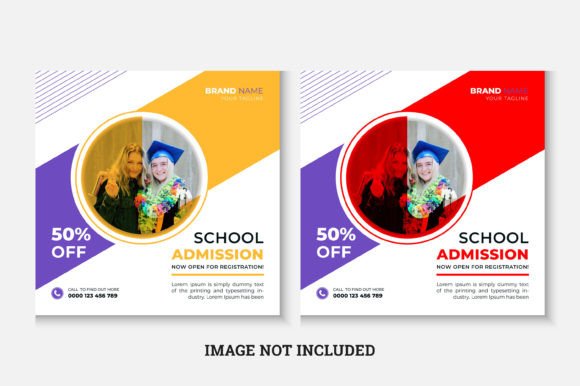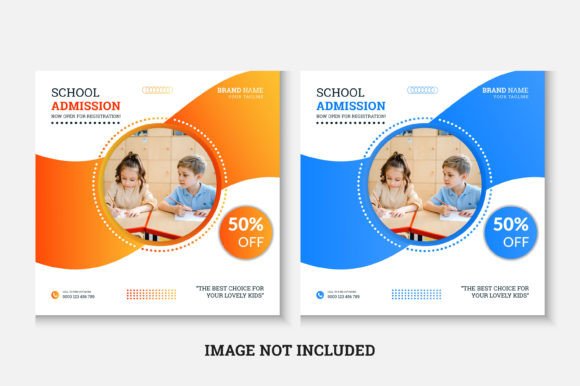
Back to School Admission Social Post
Whether you’re welcoming new students, announcing enrollment deadlines, or sharing classroom updates, a well-designed Back to School Admission Social Post helps your message stand out—without demanding design expertise.
This isn’t just another social media template. It’s a ready-to-use, 1080×1080 pixel file built for clarity and consistency across platforms like Instagram, Facebook, and LinkedIn. Designed in Adobe Illustrator CS6 (RGB color mode), it supports quick edits using standard tools—and comes with the Roboto Slab font pre-linked for seamless typography.
Who Benefits—and Why It Matters Differently
A teacher posting on a school district’s Facebook page has different needs than a freelance graphic designer building a portfolio for education clients—or a small tutoring center owner running their own ads. Let’s break that down.
Educators & School Administrators
You need trust, warmth, and authority—all in one image. A clean, professional Back to School Admission Social Post signals organization and care. You might swap in your logo, update dates, and add a short call-to-action like “Apply by August 15” or “Tours Available Weekly.” No need to hire a designer each time. Since the file is editable in Illustrator CS6, even if you haven’t used vector software before, basic text and color changes take minutes—not hours.
Freelancers & Design Professionals
You value flexibility without compromise. The included AI and EPS files mean you can scale the layout infinitely, adjust layers precisely, or export crisp PNGs for web use. If you’re delivering branded assets to multiple schools, having a consistent base template saves time while still allowing custom colors, fonts, and imagery per client. And because the structure is simple—not overloaded with decorative elements—you can focus on what matters: clear hierarchy, readable type, and strategic white space.
Small Business Owners & Learning Centers
Your budget may be tight, but your brand standards aren’t. This template skips subscription fees or monthly licensing. You download once, customize as needed, and reuse across campaigns—admissions season, open house announcements, scholarship deadlines. The RGB color mode ensures accurate previewing on screens (no surprises when posted), and the square format fits Instagram feeds and Stories thumbnails without cropping.
Bloggers, Content Creators & Marketers
You often juggle multiple roles: writer, editor, visual producer. A reliable template like this lets you shift focus from “how do I make this look good?” to “what story am I telling?” For example, a parenting blogger promoting local enrichment programs could adapt the layout with a friendly headline (“New Classes Start Soon!”), a subtle background texture, and a CTA button linking to registration. No stock photo hunt required—just drop in your own image later, or leave the space clean and minimal.
What Makes It Easy to Customize—Really
“Easy to customize” means different things depending on your experience:
- Beginners: You don’t need to understand layers or paths. Change text with the Type Tool. Swap colors using the Swatches panel. Resize elements proportionally with Shift+drag. The Help Information File walks you through each step—even how to install Roboto Slab if it’s not already on your system.
- Intermediate users: You’ll appreciate that images aren’t embedded—so you’re never stuck with someone else’s visuals. You control every asset. The AI file includes named layers (e.g., “Headline,” “Date Box,” “Logo Area”), making targeted edits intuitive.
- Advanced designers: You get full vector control—anchor points, gradients, transparency settings, and non-destructive effects. Export at any resolution, repurpose sections for email headers or print flyers, or integrate into larger brand systems.
Practical Priorities—Match Them to Your Goals
Not every project needs the same features. Here’s how to decide if this Back to School Admission Social Post fits yours:
- Ease of use: Yes—if you’ve opened Illustrator before, you’ll navigate this quickly. No plugins or third-party fonts required beyond the included link.
- Quality: Vector-based means no pixelation, ever. Crisp edges, smooth curves, and typographic precision hold up whether viewed on a phone screen or projected in a parent meeting.
- Flexibility: You control color, copy, spacing, and layout logic—not just placeholders. Want to highlight a scholarship deadline instead of enrollment? Move the date block. Prefer a two-line headline over one? Adjust line height and width freely.
- Presentation: The 1080×1080 size works natively with Instagram feed posts and Facebook cover images. It also resizes cleanly for Pinterest pins or WhatsApp status updates—no awkward cropping or letterboxing.
- Learning value: Working with a clean, well-structured AI file is a low-stakes way to build confidence in vector editing—especially helpful for educators learning digital tools or hobbyists exploring design basics.
Real Examples—How People Actually Use It
A homeschool co-op coordinator added their group’s mascot icon, changed the primary color to match their website, and used the same template for three separate announcements: fall term sign-ups, volunteer orientation, and supply list release. Each took under five minutes.
A university admissions officer adapted the layout for a series of department-specific posts—swapping in faculty headshots, program names, and application milestones. They kept the core structure intact so followers instantly recognized the campaign.
A freelance illustrator launching an online course for teachers used the template as a launch announcement post—replacing placeholder text with course details and adding a hand-drawn border in a separate layer. The clean foundation let their illustration shine without visual competition.
Before You Download—Ask Yourself
Does your current workflow involve last-minute Canva edits or rushed Photoshop tweaks that eat into planning time? Do you reuse similar messaging across seasons—and wish you had one reliable starting point? Are you looking for something that respects your time *and* your standards?
If yes, this Back to School Admission Social Post meets you where you are—whether you’re opening Illustrator for the first time or fine-tuning your tenth client project this week. There’s no learning curve baked into the design itself; just thoughtful structure, smart defaults, and room for your voice.
Support is included—not as a vague promise, but as direct access. If you hit a snag installing the font, can’t locate a layer, or want guidance adapting the file for a specific platform, help is available. That kind of reliability matters when your calendar is full and your audience is waiting.