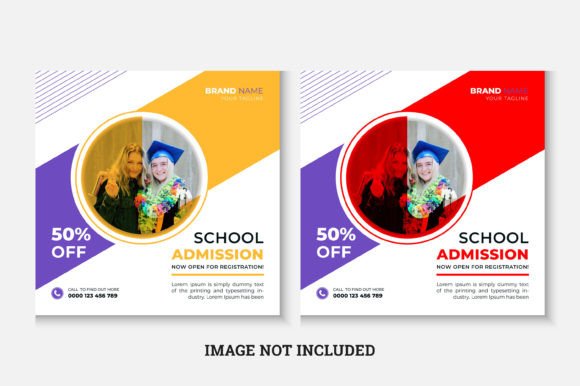
Back to School Admission Instagram Post
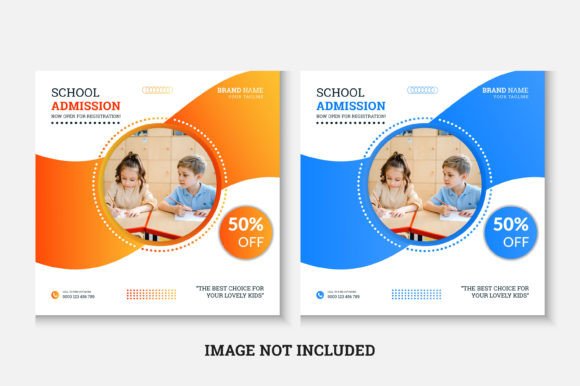
Starting a new academic year means more than just new notebooks and backpacks—it’s also about making strong first impressions online. A well-designed Back to School Admission Instagram Post helps schools, tutors, learning centers, and educational entrepreneurs welcome students and families with clarity, warmth, and professionalism—all in one square, scroll-stopping visual.
What It Is—and Why It Works
This isn’t just another social media graphic. It’s a ready-to-use, high-resolution Instagram post template built specifically for admission announcements, open house invites, enrollment deadlines, or welcome messages at the start of term. Designed at 1080×1080 pixels—the native Instagram feed size—it displays crisply on mobile and desktop without cropping or distortion.
The template comes as an editable .AI (Adobe Illustrator) and .EPS file, meaning you’re not locked into static images. You can change colors, swap text, adjust layout elements, and even reposition key sections—no design degree required. Everything is layered logically, labeled clearly, and built using RGB color mode, so what you see on screen matches what appears in-app.
Who Benefits—and How
Educators launching a new after-school program? A homeschool co-op sharing enrollment dates? A private tutor promoting fall session sign-ups? This template supports all of them—without needing a designer on retainer.
Small business owners running language academies or coding bootcamps use it to highlight limited-time offers (“First 15 enrollments get 10% off!”). Marketing teams at international schools adapt it for bilingual campaigns—just duplicate a text box and translate. Freelance content creators build branded asset libraries for clients, saving hours per campaign.
Even parents organizing neighborhood study groups have found it useful: swap in their logo, add a QR code linking to a Google Form, and post it across community groups and local parent pages.
Designed for Real-World Flexibility
It uses Montserrat—a clean, modern, highly readable sans-serif font that conveys approachability and authority in equal measure. The font link is included in your download, so installation is quick and consistent across devices.
Because it’s built in Adobe Illustrator CS6+, it opens reliably on most versions of Illustrator—even older ones used by schools with budget-limited tech setups. No Photoshop layers to manage, no rasterized text to blur when resized. Every headline, bullet point, and call-to-action stays crisp and fully editable.
Images aren’t included—that’s intentional. It keeps file size light and gives you full control over visuals that reflect your brand’s tone and audience. Want a warm photo of smiling students? A minimalist icon set? A campus skyline shot? You choose—and drop it in where the placeholder guides you.
Simple Customization, Smart Results
You don’t need to know Illustrator inside out to make meaningful changes. Common edits include:
- Updating school name, program title, and key dates in seconds
- Swapping accent colors to match your logo or seasonal palette (e.g., navy + gold for fall, teal + coral for summer sessions)
- Adding or removing bullet points to highlight benefits like “small class sizes,” “certified instructors,” or “flexible payment plans”
- Inserting your own QR code, website URL, or contact email—centered and legible
- Adjusting spacing or alignment to better fit longer institution names or multilingual text
A short Help Information File walks you through each layer, naming conventions, and safe zones—so even first-time users avoid accidental deletions or misaligned exports.
Where It Fits Into Your Workflow
Think beyond one-off posts. Use this template as part of a broader admissions toolkit:
- Instagram feed post announcing enrollment opening
- Story version (cropped or adapted) with animated stickers or countdowns
- Email header for newsletters sent to prospective families
- Print-ready flyer (scaled up and exported as PDF) for bulletin boards or handouts
- Facebook or LinkedIn banner for school pages during peak application season
Because it’s vector-based, scaling up won’t degrade quality—making it versatile across digital and light-print use cases.
Things to Keep in Mind Before You Start
While the template is beginner-friendly, a few practical notes help ensure smooth results:
- Fonts must be installed before editing—if Montserrat isn’t already on your system, use the included link to download the free version from Google Fonts
- Images are not included, but the template includes clear placeholders and sizing guidance—ideal if you’re sourcing royalty-free photos or using your own library
- Export settings matter: For best Instagram performance, save as PNG-24 with transparency turned off and background set to white or your chosen solid color
- Accessibility counts: When customizing, maintain enough contrast between text and background—especially for key details like dates and contact info
- Brand consistency matters: If you use this across multiple platforms, keep color choices, tone of voice, and visual hierarchy aligned with your other materials
Support That Actually Helps
Stuck on a layer rename? Unsure how to replace a shape without shifting alignment? The team behind this Back to School Admission Instagram Post offers direct support—not generic FAQs or chatbot loops. Whether you need help adapting it for a specific platform requirement, adjusting for accessibility standards, or preparing files for print, assistance is just an email away.
No upsells. No complicated ticket systems. Just real people helping real users get their message out—clearly, confidently, and on time.
Ready When You Are
Back-to-school season moves fast. Families decide quickly. Attention spans are shorter than ever. Having a polished, on-brand, instantly customizable Instagram post ready to go means you spend less time formatting and more time connecting—with students, parents, and partners who matter most.
This isn’t about chasing trends. It’s about showing up prepared, professional, and personable—right when it counts.