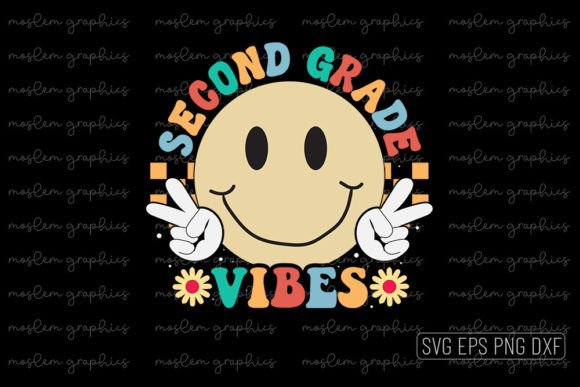
Second Grade Vibes - Back to School SVG
For educators designing classroom welcome materials, small business owners launching seasonal merchandise, or crafters preparing personalized back-to-school gifts, the Second Grade Vibes - Back to School SVG delivers a practical, production-ready design asset. Unlike generic clipart or low-resolution PNGs, this is a professionally structured vector package built for versatility across physical and digital workflows — from vinyl cutting to print-on-demand platforms.
What You’re Actually Getting (and Why It Matters)
The Second Grade Vibes - Back to School SVG arrives as a ZIP file containing four core file formats: EPS, SVG, PNG, and DXF. Each serves a distinct purpose in real-world production:
- SVG — Optimized for web-based design tools (Cricut Design Space, Canva, Adobe Express) and scalable without quality loss.
- EPS — Industry-standard for professional print shops, especially when integrating into Illustrator-based layouts or large-format printing.
- DXF — Compatible with laser cutters, CNC routers, and Silhouette Studio (including older versions that don’t fully support SVG).
- PNG — A high-resolution (300 DPI), transparent-background raster version useful for mockups, social media previews, or platforms that don’t accept vector uploads.
This multi-format approach eliminates format-related roadblocks. If you’re preparing a batch of custom mugs via Printful, the PNG works reliably. If you’re cutting iron-on transfers for student welcome kits using a Cricut Maker, the SVG or DXF ensures clean, precise edges. No conversion steps. No pixelation at larger sizes.
Design Quality and Production Readiness
The file set is labeled “100% vector,” “100% resizable,” and “100% color changeable” — and those claims hold up under scrutiny. All elements are built with clean Bezier paths, not raster traces or embedded bitmaps. Layers are logically named and grouped (e.g., “text,” “icon elements,” “outline stroke”), making selective editing straightforward in Illustrator or Affinity Designer. This isn’t a flattened, locked design — it’s editable infrastructure.
Transparency is native and preserved across all vector files. There’s no white background to manually delete before applying to dark fabrics or ceramic surfaces. The 300 DPI resolution applies to the PNG only — but since vectors scale infinitely, resolution concerns vanish entirely when working with SVG, EPS, or DXF. That means the same file can produce a crisp 2-inch decal on a pencil case or a 12-inch appliqué on a tote bag — no re-rasterizing required.
Real-World Use Cases and Workflow Integration
Where this Second Grade Vibes - Back to School SVG shines is in reducing friction between idea and output. Consider these examples:
- A Montessori teacher creates reusable name tags by cutting the design from matte vinyl on a Silhouette Cameo — then laminates and punches holes. The DXF ensures compatibility with their studio setup.
- A boutique stationery seller adds the SVG to a Canva template, changes the text to “Welcome, Class of 2029,” and exports print-ready PDFs for local offset printing on kraft cardstock.
- An Etsy shop owner uploads the PNG directly to Printify, pairs it with a unisex crewneck, and launches a limited “First Week of Second Grade” collection — no additional prep needed.
The design’s clean lines and balanced negative space also translate well to embroidery digitizing (as a starting reference) and sublimation printing on polyester blends. While not an embroidery file itself, its vector clarity gives digitizers a reliable foundation — far more usable than a scanned sketch or JPEG.
Who Benefits Most — And When It Might Fall Short
This Second Grade Vibes - Back to School SVG is best suited for users who need turnkey execution, not conceptual development. Educators building classroom resources, small batch apparel sellers, homeschool co-op coordinators, and event planners organizing school-year kickoffs will find immediate utility. Its strength lies in speed, consistency, and cross-platform reliability — not stylistic experimentation.
That said, it’s not ideal for every scenario. If your brand requires strict adherence to a custom color palette beyond basic hue shifts (e.g., Pantone spot colors with exact CMYK builds), you’ll need to manually adjust swatches — the files use RGB defaults. Similarly, while layers are organized, they aren’t tagged for accessibility (e.g., no alt-text equivalents or semantic grouping for screen readers), so it’s not suitable for creating WCAG-compliant educational materials without further adaptation.
Also note: This is strictly a digital download. There’s no physical sample, no customer support for design edits, and no licensing for resale of the raw file itself. You’re licensed to use the design in derivative products (t-shirts, mugs, etc.), but not to redistribute the SVG as a standalone asset. That’s standard for this category — but worth confirming if your use case involves white-labeling or platform-based design marketplaces.
Practical Recommendations for Best Results
To maximize value from the Second Grade Vibes - Back to School SVG, start by testing one file type in your primary workflow before scaling. For example:
- If using Cricut Design Space, import the SVG first — verify that all compound paths and text remain editable. Adjust fill colors and resize to match your material dimensions.
- If prepping for DTG printing, open the PNG in Photoshop, apply a slight unsharp mask (0.3 px radius, 50% amount) to counteract minor softness from raster export, then save as a flattened TIFF at 300 DPI.
- If submitting to a commercial printer, use the EPS — embed all fonts (or convert to outlines beforehand) and confirm bleed settings match their requirements.
Finally, keep backups of the original ZIP. Vector files are small, but corruption can occur during repeated saves or cloud sync errors. Store a copy locally and another in a versioned cloud folder — especially if you plan to modify layers for recurring use (e.g., swapping grade levels year after year).
Long-Term Value Beyond the First Week
While themed around second grade, the design’s visual language — friendly typography, balanced iconography, and neutral-yet-warm color readiness — allows subtle repurposing. Change “Second Grade” to “Grade 2” or “Year 2” for international markets. Swap the backpack icon for a lab coat or soccer ball to align with STEM camps or after-school programs. Because it’s built with editable vectors and organized layers, those adaptations take minutes — not hours.
That flexibility extends shelf life. Rather than discarding the file after September, many users report reusing it across academic calendars: as a “review week” motif in March, a “summer bridge program” graphic in June, or even a nostalgic “Alumni Day” element for elementary reunions. It’s not just a seasonal asset — it’s a modular component in a broader education-focused design system.